How to Sign Up for UserTesting in 2026 (Step-by-Step Guide)
Updated: Jun 7
The UserTesting platform is a usability testing website and app where everyday people can share their opinions on products and experiences while earning extra money online from the comfort of their homes. If you're looking for a flexible side hustle, follow the simple steps below to create your account and get started.
On a mobile device (iOS device, Android, etc.)
Go to usertesting.com

On the top left of the screen, click on the menu button (three stacked lines)

The menu will expand and display the option sign up to GET PAID TO TEST

On the bottom right of the screen, select GET PAID TO TEST

The Sign Up page to GET PAID TO TEST will display

In the Email field, enter your email address, then click Get Started

On a Computer or large device (Laptop, PC, Mac, etc.)
Go to usertesting.com

2. On the top left of the screen, click on GET PAID TO TEST button
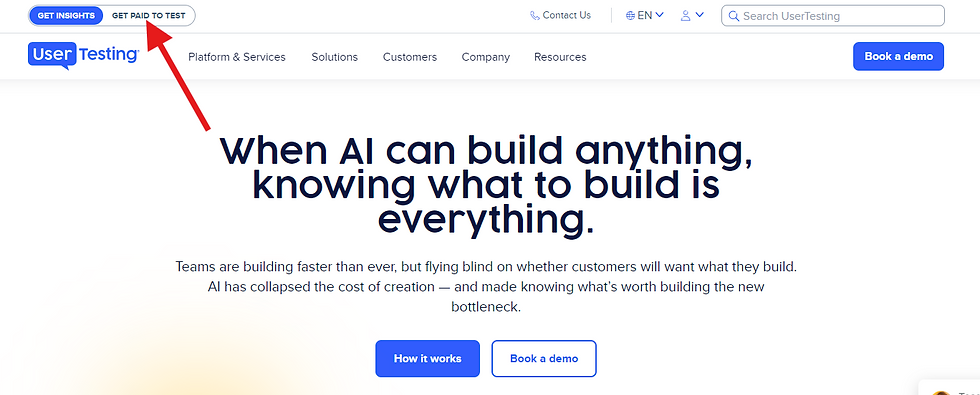
The Sign Up page to GET PAID TO TEST will display

In the Email field, enter your email address, then click Get Started

That's it! The sign-up process only takes a few minutes, and once your application is submitted, you'll be invited to complete a short practice test to join the UserTesting network.
If you're new to UserTesting, don't worry—I'll be publishing more guides soon covering the practice test, how payments work, and tips for getting more test opportunities.
Have questions? Feel free to use the contact form on this site or connect with TAGS Tech Corner on all social media platform. I'm always happy to help fellow testers get started.
Happy testing, and good luck!
Related Articles:
How Much Can You Make on UserTesting? (coming soon)
UserTesting vs DScout (coming soon)
Best Side Hustles for Beginners (coming soon)
Comments